
Optical Music Recognition (OMR)
Flat's Optical Music Recognition turns a PDF or photo of sheet music into music you can use: a fully editable score in the Flat Library, or a MusicXML or MIDI file for your own tools. You send the file, Flat recognizes the staves, notes, and symbols, and you get back the result to play, edit, and export.
Looking for the end-user OMR feature instead? See the OMR help center article and its changelog. If you or your users just want to turn files into scores without writing code, and without a Flat account, try Opuscan, our dedicated scan-to-score product.
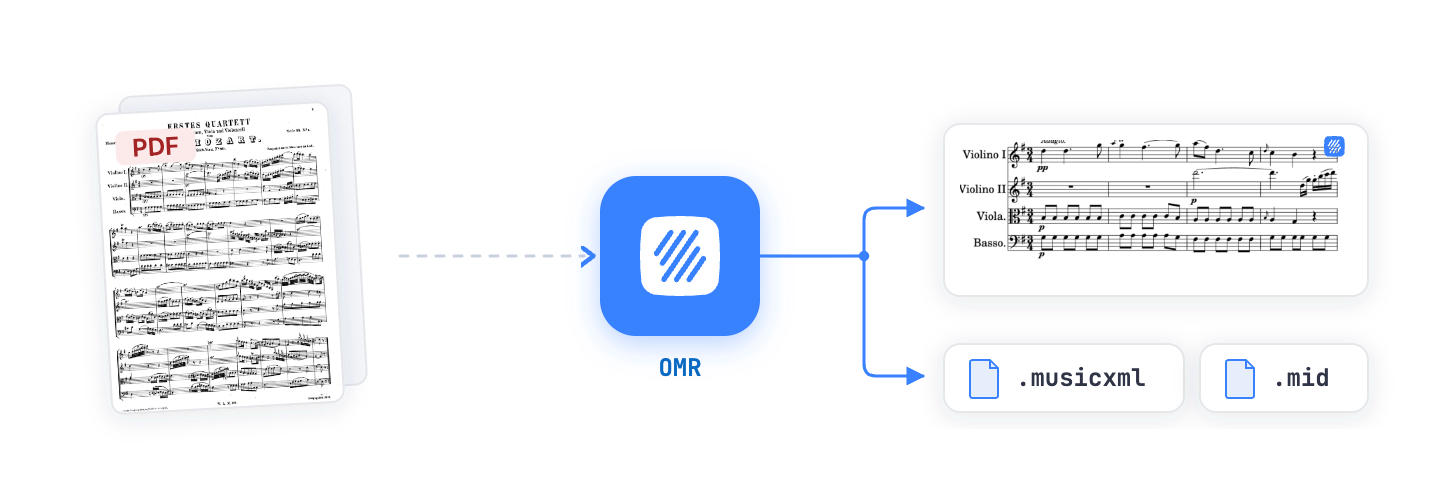
Powered by Tutteo's own AI model
Every PDF and photo is processed by Tutteo's own in-house deep-learning model, the Optical Music Recognition engine built by our company, Tutteo, behind Flat and Opuscan, not a third-party engine. It does not just spot symbols, it reads them in musical context, the way a trained musician would, so the score it rebuilds actually makes sense.
- Reads in context. Rhythm, pitch, and layout are read together, not symbol by symbol.
- Understands structure. Separates instruments and voices, and attaches lyrics, chords, and text to the right notes.
- Improves with every release. Built end to end in-house, so recognition gets measurably better over time.
Two ways to import
There are two ways to run OMR through the API:
- The Interactive Jobs API gives the best results. You can set the locales, review and correct the detected instruments and title, follow live progress, and export MusicXML without adding it to your Flat Library. It also supports adding pages one by one (ideal for mobile capture). This is the recommended path for a polished integration.
- The Auto simple import is the fewest calls and shares one code path with your MusicXML and MIDI imports: send a file to
POST /scores, poll the task, get a score. Reach for it when you just want a Library score and do not need the review step or progress.
Interactive Jobs API
Recommended. The resumable /omr pipeline: set locales, review and correct detected instruments, follow live progress, export MusicXML, and capture pages incrementally.
POST /omr/jobsGET /omr/jobs/{job}POST /omr/jobs/{job}/steps/{step} +1 more
Auto simple import
Imports into the Flat Library through the same POST /scores endpoint you use for MusicXML, MIDI, and other formats. Send a file, poll the task, get a score. Fewest calls, no review step.
POST /scoresGET /tasks/{task}
| Interactive Jobs API | Auto simple import | |
|---|---|---|
| Endpoint | /omr/jobs/* | POST /scores (+ tasks) |
| Best for | Controlling instruments and locales, a progress UI, multi-image or mobile capture | A single PDF, or unifying MusicXML / MIDI / PDF import behind one call |
| Result | A Library score, or a MusicXML file you download directly (without importing it into the Library) | A score in the Flat Library |
| Review step | Optional details step (correct title, language, instruments) | No |
| Live progress | Long-polling with a localized progress key | Task percent |
| Calls to ship | 3 or more | 2 |
The developer dashboard
The developer dashboard shows the OMR activity of your Flat account: the same jobs, credits, and results the API returns, whichever token or app created them.
| View | What it shows |
|---|---|
| Get started | Your balance, a link to create a token with the omr scope, and your most recent jobs. |
| Playground | Runs a job on one of your files with output: musicxml, so nothing is added to your library. The charge is confirmed before the job starts. |
| Jobs | Every job on the account, filterable by status and retention state, with the same fields as GET /omr/jobs. |
Job page (/developers/omr/jobs/{job}) | One job: live progress, the details review step when it pauses, the downloads, the retention deadline, and a button to erase its files now. |
| Credits | The balance per pool and the credit ledger, the same data as GET /billing/credits/history. |
Jobs and credits are account-wide: the Playground, your scripts, and every app on the account share one list and one balance.
Authentication and scopes
Every OMR request is authenticated like the rest of the API (see Authentication). A Personal Access Token is the quickest way to start.
For OAuth2 apps, request these scopes:
| Scope | When you need it |
|---|---|
omr | Every OMR request (both flows). |
scores | Additionally, whenever OMR creates a score in the Library: the Auto simple import, and the Interactive Jobs API with output: library (the default). Not needed for output: musicxml. |
In the Interactive Jobs API, a request that creates a Library score without the scores scope is rejected with 403 (OMR_SCORES_SCOPE_REQUIRED). The Auto simple import enforces the scores scope through the standard endpoint scope check, and separately returns 403 (OMR_SCOPE_REQUIRED) when the omr scope is missing. Personal access tokens and web sessions carry the account's own permissions and are not subject to these OAuth scope checks.
Capabilities and credits
OMR runs on credits tied to a Flat account, charged per page at job start. Call GET /omr/capabilities to feature-detect at runtime instead of hardcoding limits: it returns the supported steps, export formats and outputs, the file and page limits, costPerPage, and the account's remainingCredits. See the getOmrCapabilities reference for the full response.
The response also carries retentionDays (30 by default), how long a job's files and results are kept, and localesDetails, the recognition languages with their English names, ready for a language picker. See Retention and deletion.
No authentication is needed to call it, so you can feature-detect before a user connects their account. Called without one, the limits returned are those of the free plan and remainingCredits is omitted, since there is no account to report a balance for.
1 credit is 1 page (costPerPage is 1), drawn from the same pool as the Flat web, desktop, and mobile apps. There is no separate API meter.
Read remainingCredits before you start a job so a user never discovers the problem as a failure:
bash
curl -H "Authorization: Bearer $TOKEN" "https://api.flat.io/v2/omr/capabilities"js
const caps = await fetch('https://api.flat.io/v2/omr/capabilities', { headers: auth }).then((r) => r.json());

if (pageCount * caps.costPerPage > caps.remainingCredits) {
  // Send the user to https://flat.io/settings/ai-credits before starting the job.
}
python
caps = requests.get("https://api.flat.io/v2/omr/capabilities", headers=auth).json()

if page_count * caps["costPerPage"] > caps["remainingCredits"]:
    # Send the user to https://flat.io/settings/ai-credits before starting the job.
    ...
Current limits
These are today's values, given so you can size an integration before writing code. They are not contractual, and an unauthenticated call reports the free plan's limits, so read them from GET /omr/capabilities with your own token rather than hardcoding them.
| Limit | Current value | Capabilities field |
|---|---|---|
| Pages per job | 50 | maxPages |
| Files per job | 100 | maxFiles |
| Size per file | 100 MiB | maxFileSize |
| Jobs to start at once (suggested, not enforced) | 10 | maxParallelJobs |
| Accepted input types | PDF, JPEG, PNG, WebP, TIFF, GIF, AVIF, HEIC, HEIF | acceptedMimeTypes |
These limits are adjustable: contact us if your workload needs more. They are separate from the API rate limits, which cap requests per hour.
Processing time
A single-page document typically takes around 30 seconds, and occasionally up to about a minute per page. Multi-page documents are processed partly in parallel depending on the pages, parts, and instruments involved, so total time does not grow linearly with page count.
The Interactive Jobs API reports live progress and supports long-polling, so you can show real progress instead of guessing.
Whose credits are spent
Credits belong to the Flat account that owns the token you authenticate with:
- With a Personal Access Token, that is your own account.
- With OAuth2, that is the account of the user who authorized your app.
For each job, credits are drawn in this order:
- The page allowance included in the account's Flat or Flat for Education subscription.
- Credit packs bought on the account. Packs do not expire while the account is active.
A single account can process files on behalf of any number of end users, who do not need Flat accounts of their own. That is the usual shape for a commercial integration: your backend holds one token, your users never see Flat. Use OAuth2 instead when each conversion should be billed to your user's own Flat account.
Opuscan credits are separate
Opuscan is a separate consumer product sold through the app stores. Credits bought inside Opuscan are tied to that store account and cannot be used with this API, and credits on your Flat account do not appear in Opuscan. See the FAQ.
Buying credits
Credit packs are purchased from your account's AI credits page. Packs run up to 3,000 credits, and the price per page improves at every size, with the best rates on the largest packs. Usage-based (pay as you go) billing is planned for a future release.
Packs are one-off purchases: not a subscription, no auto-renewal, and no expiry while the account is active. The 1,000 and 3,000 packs sit behind the "Need 1000+ credits?" link on that page rather than in the default grid.
Credits are only ultimately consumed by successful conversions. They are charged when a job starts, then reverted if the job ends in error or is canceled before the worker finishes.
When the account is out of credits, over quota, or the plan does not include OMR, requests that consume credits return 402. Show remainingCredits and costPerPage to warn users before you start a job, and point them to flat.io/settings/ai-credits to top up.
Need more than the largest pack? Contact us to discuss custom pricing and a contract for larger volumes.
What OMR can read
OMR works best on clean, printed sheet music: engraved scores, good scans, and sharp photos, in standard notation (single instruments, grand-staff, and multi-instrument scores). Handwritten music and tablature are not supported. As a rule of thumb, if a page is hard for a person to read, it is hard for Flat to read.
For the full, up-to-date details, see the help center:
- Which notations are supported (the complete recognition matrix).
- Getting the best results (capture and file-preparation tips).
- OMR changelog (recognition improvements over time).
For lyric language support, what to do about an inaccurate conversion, and how to tell which model version produced a result, see the recognition quality FAQ.
Commercial use, privacy, and terms
You can use OMR to process sheet music uploaded by customers who hold the necessary rights, and deliver the resulting MusicXML and MIDI to them outside of Flat. No attribution is required, and there is no requirement to keep the result in a Flat library. You and your users remain responsible for having the appropriate rights to the source material.
Files you submit, and the outputs generated from them, are not used to train or improve our models. Our recognition models are trained on synthetic data we generate ourselves and on public-domain sheet music we source independently.
The API is covered by Flat's Terms of Service and Privacy Policy. You can rely on our published Data Processing Addendum, and our infrastructure providers, subprocessors, and hosting regions are documented in the data and infrastructure article.
See the commercial use, privacy, and data FAQ for the detail, including exactly what remains after a job is deleted.
Errors
A failed job reports a stable errorCode plus a localized errorMessage. The Auto simple import surfaces the same failures through the task's error message. errorCode is an open string: new codes may be added, so branch on the ones you handle and keep a generic fallback.
errorCode | Meaning |
|---|---|
NO_MUSIC_DETECTED | No musical content found (poor scan, rotated page, or tablature). |
CORRUPTED_FILE | The input file is corrupted and could not be read. |
UNSUPPORTED_FORMAT | The file format or notation is not supported yet. |
UNSUPPORTED_TABLATURE | The file is guitar tablature, not supported yet. |
ENCRYPTED_PDF | The PDF is password-protected. |
TOO_LARGE | The document is too large or has an unusual shape to process. |
ENGINE_TIMEOUT | Recognition took longer than expected and was stopped. |
GENERIC | Unspecified failure. |
HTTP statuses you should handle:
| Status | When it happens |
|---|---|
400 | Invalid request, for example adding a file to a job that is no longer a draft (OMR_JOB_NOT_DRAFT), or a file whose type cannot be determined (OMR_MIME_REQUIRED). |
402 | Out of credits, over quota, or OMR not included in the plan. See Buying credits and Why did I get a 402?. |
403 | Missing a required scope: OMR_SCOPE_REQUIRED (the omr scope), or OMR_SCORES_SCOPE_REQUIRED (the scores scope for Library output in the Jobs API). Also returned when acting on a job the account does not own. |
404 | Job, task, or export not found (or the requested export format is not available). |
409 | State conflict, for example submitting a step the job is not awaiting, or canceling a job the worker is actively processing. Also OMR_JOB_EXPIRED when the job's data has been erased, OMR_JOB_IN_PROGRESS when deleting a job that has not finished, and OMR_JOB_NOT_EXPIRABLE when deleting a job whose result went to the Library. |
See the Errors page for the general error response format.
Next steps
- Auto simple import - the quickest path to a score.
- Interactive Jobs API - full control, progress, and the review step.
- FAQ - credits and billing, limits, recognition quality, and commercial use.
- Instrument IDs - the catalog used to correct detected parts.
- Developer dashboard - your jobs, credits, and a playground, without code.
- API Reference: OMR.